A long time ago, one of the users of my Strava Segment Explorer asked for the ability to filter segments by whether they had a Local Legend. Well, now you can! Most segments still don't have the data required so it may not be currently that useful, but over time it should become more helpful. From my own experimentation, it seems the segments that don't have a Local Legend set are ones nobody has ridden recently or that are flagged as hazardous
Showing posts with label Strava. Show all posts
Showing posts with label Strava. Show all posts
Sunday, September 25, 2022


Monday, September 19, 2022
Downloadable segment lists
I've just added a new feature to the site. When using the segment explorer, you can download a CSV file of the segments you're viewing. The CSV file will include all the segments I know about in the area, which could be more than what is displayed on the map.
I've limited the maximum area for which the site will return data, mostly to protect my server from malicious or daft users.
The columns returned are currently just what's displayed in the table. If you need other data, let me know. Also let me know if you have any suggestions or find any problems
Saturday, January 01, 2022
C# code to generate a segment FIT file
Someone asked about getting hold of the code to generate FIT files from Strava segments. It's not possible to provide standalone code since it's has dependencies on the rest of my website and a Strava library, but here's what I use which may give people an idea of how to use the rather confusing Garmin FIT API
using System;
using System.Collections.Generic;
using System.IO;
using System.Web;
using Dynastream.Fit;
using Newtonsoft.Json.Linq;
using Strava.Common;
using Strava.Segments;
using Strava.Streams;

public static class FitGenerator
{
  private static void AddLeaderEntry(SegmentPointMesg newRecord, int goal, float currentDistance,
    float totalDistance, byte goalIndex)
  {
    if (goal != 0)
    {
      var currentGoalTime = (float)Math.Floor(currentDistance / totalDistance * goal);
      newRecord.SetLeaderTime(goalIndex, currentGoalTime);
    }
  }

  private static SegmentLeaderboardEntryMesg GetLeaderboard(int goal, byte goalIndex,
    SegmentLeaderboardType type, string name)
  {
    var goalLeaderboard = new SegmentLeaderboardEntryMesg();
    if (goal != 0)
    {
      goalLeaderboard.SetMessageIndex(goalIndex);
      goalLeaderboard.SetSegmentTime(goal);
      goalLeaderboard.SetType(type);
      if (!string.IsNullOrEmpty(name))
        goalLeaderboard.SetName(name);
    }

    return goalLeaderboard;
  }

  private static int LatOrLngToSemicircle(double latOrLng)
  {
    return (int)(latOrLng * (Math.Pow(2, 31) / 180));
  }

  private static bool HasPr(List<SegmentStream> pr, Segment seg)
  {
    if (pr != null)
      return true;
    if (seg.AthleteSegmentStats != null && seg.AthleteSegmentStats.PrElapsedTime != null)
      return true;

    return false;
  }

  public static byte[] Generate(Segment seg, int goal, string goalName, int rival, string rivalName,
    int challenger, string challengerName)
  {
    List<SegmentStream> altitude = null;
    try
    {
      StravaBaseHandler.TryStravaRequest((client) =>
      {
        altitude = client.Streams.GetSegmentStream(seg.Id.ToString(),
          SegmentStreamType.Altitude | SegmentStreamType.LatLng);
      });
    }
    catch (Exception ex)
    {
      throw new Exception("Failed to get stream for segment " + seg.Id, ex);
    }

    // get all the streams we are interested in
    SegmentStream locationStream = null;
    SegmentStream altitudeStream = null;
    SegmentStream distanceStream = null;

    locationStream = SegmentStream.GetStream(altitude, StreamType.LatLng);
    altitudeStream = SegmentStream.GetStream(altitude, StreamType.Altitude);
    distanceStream = SegmentStream.GetStream(altitude, StreamType.Distance);

    // grab user's best time
    List<SegmentStream> pr = null;
    var athlete = HttpContext.Current.Request.Cookies["athlete"];
    if (athlete != null)
    {
      try
      {
        pr = StravaBaseHandler.GetSegmentPr(seg.Id.ToString(), athlete.Value);
      }
      catch
      {
        // do nothing
      }
    }

    // Generate some FIT messages
    // Every FIT file MUST contain a 'File ID' message as the first message
    var fileIdMesg = new FileIdMesg();
    var records = new List<SegmentPointMesg>();

    fileIdMesg.SetType(Dynastream.Fit.File.Segment);
    fileIdMesg.SetManufacturer(Manufacturer.Strava);  // Types defined in the profile are available
    fileIdMesg.SetProduct(65534);
    fileIdMesg.SetTimeCreated(new Dynastream.Fit.DateTime(System.DateTime.Now));
    fileIdMesg.SetSerialNumber(1);
    fileIdMesg.SetNumber(1);

    var fileCreator = new FileCreatorMesg();
    fileCreator.SetHardwareVersion(0);
    fileCreator.SetSoftwareVersion(0);

    // segment ID
    var segmentId = new SegmentIdMesg();
    segmentId.SetName(seg.Name);
    segmentId.SetEnabled(Bool.True);

    if (seg.ActivityType == "Run")
      segmentId.SetSport(Sport.Running);
    else
      segmentId.SetSport(Sport.Cycling);

    byte prIndex = 0;
    byte goalIndex = 1;
    byte rivalIndex = 2;
    byte challengerIndex = 3;
    byte komIndex = 4;
    byte qomIndex = 5;

    if (!HasPr(pr, seg))
    {
      goalIndex--;
      rivalIndex--;
      challengerIndex--;
      komIndex--;
      qomIndex--;
    }

    if (goal == 0)
    {
      rivalIndex--;
      challengerIndex--;
      komIndex--;
      qomIndex--;
    }

    if (rival == 0)
    {
      challengerIndex--;
      komIndex--;
      qomIndex--;
    }

    if (challenger == 0)
    {
      komIndex--;
      qomIndex--;
    }

    if (seg.KOM() == 0)
    {
      qomIndex--;
    }

    segmentId.SetSelectionType(SegmentSelectionType.Starred);
    segmentId.SetUuid(Guid.NewGuid().ToByteArray());
    if (HasPr(pr, seg))
      segmentId.SetDefaultRaceLeader(prIndex);

    if (seg.Map.Polyline == "")
      throw new Exception("The segment has no map data (which is somewhat unexpected), " +
        "I can't generate the FIT file");

    var points = PolylineDecoder.Decode(seg.Map.Polyline);

    // figure out SW and NE
    double swLat = 1000;
    double swLong = 1000;
    double neLat = -1000;
    double neLong = -1000;
    foreach (var pt in points)
    {
      swLat = Math.Min(swLat, pt.Latitude);
      swLong = Math.Min(swLong, pt.Longitude);
      neLat = Math.Max(neLat, pt.Latitude);
      neLong = Math.Max(neLong, pt.Longitude);
    }

    // segment info
    var lap = new SegmentLapMesg();
    lap.SetUuid(Guid.NewGuid().ToByteArray());
    lap.SetTotalDistance(seg.Distance);
    lap.SetTotalAscent((ushort)seg.TotalElevationGain);
    lap.SetSwcLat(LatOrLngToSemicircle(swLat));
    lap.SetSwcLong(LatOrLngToSemicircle(swLong));
    lap.SetNecLat(LatOrLngToSemicircle(neLat));
    lap.SetNecLong(LatOrLngToSemicircle(neLong));
    lap.SetMessageIndex(1);
    lap.SetStartPositionLat(LatOrLngToSemicircle(points[0].Latitude));
    lap.SetStartPositionLong(LatOrLngToSemicircle(points[0].Longitude));
    lap.SetEndPositionLat(LatOrLngToSemicircle(points[points.Count - 1].Latitude));
    lap.SetEndPositionLong(LatOrLngToSemicircle(points[points.Count - 1].Longitude));

    // goal entry
    var goalLeaderboard = GetLeaderboard(goal, goalIndex, SegmentLeaderboardType.Goal, goalName);
    var rivalLeaderboard = GetLeaderboard(rival, rivalIndex, SegmentLeaderboardType.Rival, rivalName);
    var challengerLeaderboard =
      GetLeaderboard(challenger, challengerIndex, SegmentLeaderboardType.Challenger, challengerName);
    var komLeaderboard = GetLeaderboard(seg.KOM(), komIndex, SegmentLeaderboardType.Kom, "");
    var qomLeaderboard = GetLeaderboard(seg.QOM(), qomIndex, SegmentLeaderboardType.Qom, "");

    SegmentStream prDistanceStream = null;
    SegmentStream prTimeStream = null;
    if (pr != null)
    {
      prDistanceStream = SegmentStream.GetStream(pr, StreamType.Distance);
      prTimeStream = SegmentStream.GetStream(pr, StreamType.Time);
    }

    SegmentLeaderboardEntryMesg prLeaderboard = null;
    if (HasPr(pr, seg))
    {
      prLeaderboard = new SegmentLeaderboardEntryMesg();
      prLeaderboard.SetMessageIndex(prIndex);
      var prTime = seg.AthleteSegmentStats.PrElapsedTime;
      prLeaderboard.SetSegmentTime(prTime);
      prLeaderboard.SetType(SegmentLeaderboardType.Pr);
    }

    for (var i = 0; i < locationStream.Data.Count; i++)
    {
      var newRecord = new SegmentPointMesg();
      var latLng = locationStream.Data[i];
      if (latLng != null)
      {
        var intLat = LatOrLngToSemicircle(Convert.ToDouble(((JArray)(latLng)).First));
        newRecord.SetPositionLat(intLat);
        var intLng = LatOrLngToSemicircle(Convert.ToDouble(((JArray)(latLng)).Last));
        newRecord.SetPositionLong(intLng);
      }

      if (altitudeStream != null)
        newRecord.SetAltitude(Convert.ToSingle(altitudeStream.Data[i]));
      var currentDistance = Convert.ToSingle(distanceStream.Data[i]);
      newRecord.SetDistance(currentDistance);
      newRecord.SetMessageIndex((ushort)i);

      if (HasPr(pr, seg))
      {
        if (pr != null)
        {
          // add PR time
          // find index of the PR item that is at or beyond current distance
          var pos = prDistanceStream.Data.Count - 1;
          for (var j = 0; j < prDistanceStream.Data.Count; j++)
          {
            if (Convert.ToSingle(prDistanceStream.Data[j]) -
              Convert.ToSingle(prDistanceStream.Data[0]) >= currentDistance)
            {
              pos = j;
              break;
            }
          }
          // find time at that distance
          if (pos > 0)
          {
            var prStartDistance = Convert.ToSingle(prDistanceStream.Data[pos - 1]) -
              Convert.ToSingle(prDistanceStream.Data[0]);
            var prEndDistance = Convert.ToSingle(prDistanceStream.Data[pos]) -
              Convert.ToSingle(prDistanceStream.Data[0]);
            var fraction = (currentDistance - prStartDistance) / (prEndDistance - prStartDistance);

            var prTime = Convert.ToSingle(prTimeStream.Data[pos - 1]) + fraction *
              (Convert.ToSingle(prTimeStream.Data[pos]) - Convert.ToSingle(prTimeStream.Data[pos - 1]));

            newRecord.SetLeaderTime(prIndex,
              (float)Math.Floor(prTime - Convert.ToSingle(prTimeStream.Data[0])));
          }
          else
          {
            newRecord.SetLeaderTime(prIndex, 0);
          }
        }
        else
        {
          AddLeaderEntry(newRecord, seg.AthleteSegmentStats.PrElapsedTime.Value, currentDistance,
            seg.Distance, prIndex);
        }
      }

      // add goal time
      AddLeaderEntry(newRecord, goal, currentDistance, seg.Distance, goalIndex);
      AddLeaderEntry(newRecord, rival, currentDistance, seg.Distance, rivalIndex);
      AddLeaderEntry(newRecord, challenger, currentDistance, seg.Distance, challengerIndex);
      AddLeaderEntry(newRecord, seg.KOM(), currentDistance, seg.Distance, komIndex);
      AddLeaderEntry(newRecord, seg.QOM(), currentDistance, seg.Distance, qomIndex);

      records.Add(newRecord);
    }

    // Create file encode object
    var encodeDemo = new Encode(ProtocolVersion.V20);

    using (var fitDest = new MemoryStream())
    {

      // Write our header
      encodeDemo.Open(fitDest);

      // Encode each message, a definition message is automatically generated and output if necessary
      encodeDemo.Write(fileIdMesg);
      encodeDemo.Write(fileCreator);
      encodeDemo.Write(segmentId);
      if (prLeaderboard != null)
        encodeDemo.Write(prLeaderboard);
      if (goal != 0)
        encodeDemo.Write(goalLeaderboard);
      if (rival != 0)
        encodeDemo.Write(rivalLeaderboard);
      if (challenger != 0)
        encodeDemo.Write(challengerLeaderboard);
      if (seg.KOM() != 0)
        encodeDemo.Write(komLeaderboard);
      if (seg.QOM() != 0)
        encodeDemo.Write(qomLeaderboard);

      encodeDemo.Write(lap);
      encodeDemo.Write(records);
      encodeDemo.Close();

      fitDest.Flush();
      fitDest.Position = 0;
      return fitDest.ToArray();
    }
  }
}
Wednesday, August 18, 2021
Strava segment explorer with new maps
I’ve updated my Strava segment explorer page to use different maps. These maps include more tracks and paths and also show contour lines to give you more of an idea of the gradient you’ll be facing. Other than that, it should work just the same as before. Of course I may have introduced a bug or two so let me know if you have any problems. Unfortunately I can no longer support Internet Explorer with these maps.
Sunday, October 07, 2018
New features on doogal.co.uk
I’ve been making a few enhancements to the website recently so thought I’d point out a few things that might be of interest.
Editable labels on geocoded locations – The labels displayed on the map after geocoding can now be edited. Editing the label will update the text output and the KML output.
Coloured elevation charts – I’ve updated my elevation charts to include colours based on the gradient at that point of the route/segment. Here’s Box Hill in all its technicolour glory. Due to the variable quality of elevation data, it can sometimes be difficult to calculate sensible gradients, so let me know if you see anything that doesn’t look sensible.
View your starred segments – The segment viewer page had fairly limited functionality before so I’ve now added the ability to view all your starred segments. If you’ve connected my website to Strava on the segment explorer page, you should see a ‘View starred segments’ button which will display them all on a map. This will be quite slow to load initially if the segments are not already available on the site, but should be quicker on subsequent loads. It’s also currently limited to 100 segments.
Thursday, August 23, 2018
Decoding paths in here maps
In my panic to move my website off Google Maps, I took some shortcuts. One of those was to continue to use the helper function google.maps.geometry.encoding.decodePath. I primarily use this for decoding the paths of Strava segments, since these are encoded using the same algorithm as Google. But loading up the Google Maps API script for a single function is rather ridiculous, so I’ve converted the path decoder from the rather marvellous (and seemingly abandoned) Strava.NET library.
For your pleasure, here is some TypeScript that will create a here maps LineString from an encoded path. Other map providers are available and adjusting it for them should be fairly straightforward.
function decodePath(polylinechars: string): H.geo.LineString {
  var poly = new H.geo.LineString();

  if (polylinechars == null || polylinechars === "") {
    return poly;
  }

  var index = 0;

  var currentLat = 0;
  var currentLng = 0;

  while (index < polylinechars.length) {
    // calculate next latitude
    var sum = 0;
    var shifter = 0;
    var next5bits;
    do {
      next5bits = polylinechars.charCodeAt(index++) - 63;
      sum |= (next5bits & 31) << shifter;
      shifter += 5;
    } while (next5bits >= 32 && index < polylinechars.length);

    if (index >= polylinechars.length)
      break;

    currentLat += (sum & 1) == 1 ? ~(sum >> 1) : (sum >> 1);

    // calculate next longitude
    sum = 0;
    shifter = 0;
    do {
      next5bits = polylinechars.charCodeAt(index++) - 63;
      sum |= (next5bits & 31) << shifter;
      shifter += 5;
    } while (next5bits >= 32 && index < polylinechars.length);

    if (index >= polylinechars.length && next5bits >= 32)
      break;

    currentLng += (sum & 1) == 1 ? ~(sum >> 1) : (sum >> 1);

    poly.pushPoint(new H.geo.Point(currentLat / 100000.0, currentLng / 100000.0));
  }

  return poly;
}
Saturday, March 03, 2018
Converting Strava segments to FIT files
Strava Premium users who own a Garmin can sync their favourite Strava segments with their Garmin device automatically. But that’s not an option available to free users. Apparently this site used to be able to generate the FIT files used by Garmins but Strava made some fairly radical changes to their API that broke that site (and many others).
So I’ve added a FIT file export to my Segment Explorer. Due to rather inclement weather I’ve not been able to test this out on the road yet, but downloading the FIT file and shoving it in my Garmin\NewFiles folder displays it in my Segments list so it seems to work. If you authorize my app then your PR time will also be included in the file.
Update – You can now add a goal to the generated FIT file if you generate the file from the segment details page
Sunday, October 08, 2017
Adjusting Strava KOM speeds for gradient
I’ve been wanting to improve the algorithm behind my Strava segment chooser for some time. Until now it’s been based off the number of riders who’ve attempted the segment and the power output of the KOM. It gave reasonable results but had to ignore any segments whose KOM didn’t have any power data recorded (either from a power meter or estimated based off the rider’s weight and speed). And although more power means more speed, a heavier rider will have to output more power to go at the same speed so the power output isn’t the perfect indicator of how difficult a KOM is to beat.
But using speed also has its problems. 20 mph on a flat segment is generally not going to win any KOMs but 20mph on a 10% gradient may well do. Adjusting the KOM speed for the gradient of the segment has been my aim for a while, but I haven’t had a chance to look at it until now.
Since I now have quite a few segments in my database, I thought it was time to analyse KOM speeds against gradient. I put each segment in a bucket based on its gradient and calculated the average KOM speed. This gave me the following, rather surprising graph.
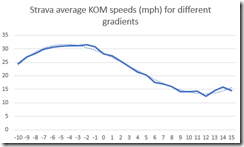
For gradients between about –2% and 10%, things work as I’d expect. The steeper the gradient, the slower the KOMs are. Beyond that, things get a bit weird. Steeper uphill segments get a little faster and steeper downhill segments get a little slower. I have a few ideas about why this might be (more mountain bike segments, the terror induced by a steep downhill) but nothing definitive.
Whatever the reason, I decided to ignore segments outside –2% to 10%. The graph in this range can be approximated to a straight line so calculating an adjusted speed is fairly easy. I’ve applied this to my segment chooser and the results are, er, much the same as before…
Monday, June 26, 2017
Recovering data from a crashed Garmin 810
I love my Garmin and it would be a perfect piece of tech if it weren’t for one problem. Almost every time I use it to follow a course, it will die at some point during the ride. I can turn it back on and after several minutes of confusion it will figure out where it is and I can resume recording. The suggestions on the Garmin forum mostly seem to be to downgrade to an older version of the firmware, but I’m too lazy to do that and keep hoping Garmin will fix it at some point.
But they haven’t yet, so I just live with it. So I thought I’d document what I do to recover the data from before the crash. When I plug the Garmin in, the data from after the crash will sync to Strava but it will also complain that something failed to sync. So the first thing to do is to manually upload the pre-crash data to Strava. This will be a .fit file in the Garmin\Activities folder of the device. Strava seems to be able to cope with the file, even though the Garmin sync can’t.
You may be happy enough just doing that, but I like to have an accurate record of my rides so I want to merge the two together. So I now
- Export the two activities from Strava as GPX files.
- Open them both in this tool.
- Select both files, right click and merge them
- In the newly created file, select both tracks, right click and select Restructuring/Join
- Save the new file
- Delete the two original activities from Strava
- Upload the newly created file to Strava and feel satisfied with all the PRs I’ve hopefully achieved…
Sunday, April 10, 2016
Sampling Strava again
I thought I’d repeat the experiment conducted by Mark Slavonia last year to see how the Strava usage numbers stack up now.
First I needed to know the number of signed up users of Strava. This is pretty straightforward, head off to https://www.strava.com/athletes/6161562 and keep increasing the number at the end until Strava says it can’t find a user. Last March there were 8.2 million users, now there are about 14.4 million, not a bad increase for just over a year.
Next I wanted to capture the active users and the premium users. Since I’m a techy, I can automate this process using the Strava API and a .NET wrapper around it. So I decided to sample 1 in every 10,000 users, giving me about 1,440 sample users which should give the results a reasonable accuracy.
After pulling down that data, the first thing I noticed was that 47 of my requests had returned ‘Not Found’ errors. In fact, most of these were grouped together, suggesting Strava decided to restart their numbering with larger IDs at some point. So the total number of users is probably just shy of 14 million.
As an aside, I’m a Premium member, but not because Strava offers particularly compelling features for Premium users, but mainly to show my support for a website that is exceedingly useful and fun. I suspect Strava could differentiate between free and Premium a lot more to increase the percentage of Premium users. Take a look at all the functionality available at veloviewer.com.
First I needed to know the number of signed up users of Strava. This is pretty straightforward, head off to https://www.strava.com/athletes/6161562 and keep increasing the number at the end until Strava says it can’t find a user. Last March there were 8.2 million users, now there are about 14.4 million, not a bad increase for just over a year.
Next I wanted to capture the active users and the premium users. Since I’m a techy, I can automate this process using the Strava API and a .NET wrapper around it. So I decided to sample 1 in every 10,000 users, giving me about 1,440 sample users which should give the results a reasonable accuracy.
After pulling down that data, the first thing I noticed was that 47 of my requests had returned ‘Not Found’ errors. In fact, most of these were grouped together, suggesting Strava decided to restart their numbering with larger IDs at some point. So the total number of users is probably just shy of 14 million.
Premium Users
Of the 1.393 users I had left, 28 were Premium users, so approximately 2% of all users. This figure is pretty close to last year’s figure so I’m happy to believe it. That equates to 280,000 premium users or $16.6 million in revenue for Strava.As an aside, I’m a Premium member, but not because Strava offers particularly compelling features for Premium users, but mainly to show my support for a website that is exceedingly useful and fun. I suspect Strava could differentiate between free and Premium a lot more to increase the percentage of Premium users. Take a look at all the functionality available at veloviewer.com.
Active Users
The Strava API doesn’t let me get activity data for other users, so I’m not able to find out how active users are directly. But it does provide an Updated field, which I’m hoping gets updated when a user uploads an activity (the Strava API docs are a little vague on this point). Using last year’s definition of an active user being someone who has done something in the last 24 days, how many active users are there? I found 181 users where that Updated field was in the last 24 days. That’s about 13%, or 1.8 million active users. The percentage is again fairly close to last year’s figure so I’m happy to go with it.Gender
I found 806 men and 270 women and 317 blanks. Ignoring the blanks, that almost exactly a 75% / 25% split between men and women.By Country
I think my sample is too small to draw accurate conclusions from the home countries of Strava users, but lets play with the numbers anyway. 463 had blank entries for the country which leaves 930 users with a country specified. I’ve removed countries with less than 5 users in my sample and then adjusted for population. Below I’ve highlighted the countries where more than 2% of the population have signed up for Strava. It seems like there is massive potential to increase usage in many countries, although that may depend on whether there is a culture of recreational running and riding in these countries (China and India being the obvious biggest potential markets). And little old blighty, the UK, is top of the pile. Go UK!| Country | Population | Sampled users | Approximate Strava users | % of population |
| Australia | 24,309,330 | 35 | 527,000 | 2.2 |
| Austria | 8,569,633 | 5 | 75,000 | 0.9 |
| Belgium | 11,371,928 | 6 | 90,000 | 0.8 |
| Brazil | 209,567,920 | 74 | 1,114,000 | 0.5 |
| Canada | 36,286,378 | 25 | 376,000 | 1.0 |
| Chile | 18,131,850 | 6 | 90,000 | 0.5 |
| Colombia | 48,654,392 | 9 | 135,000 | 0.3 |
| Denmark | 5,690,750 | 5 | 75,000 | 1.3 |
| France | 64,668,129 | 35 | 527,000 | 0.8 |
| Germany | 80,682,351 | 18 | 271,000 | 0.3 |
| India | 1,326,801,576 | 5 | 75,000 | 0.0 |
| Ireland | 4,713,993 | 9 | 135,000 | 2.9 |
| Italy | 59,801,004 | 37 | 557,000 | 0.9 |
| Japan | 126,323,715 | 9 | 135,000 | 0.1 |
| Mexico | 128,632,004 | 6 | 90,000 | 0.0 |
| Netherlands | 16,979,729 | 32 | 482,000 | 2.8 |
| New Zealand | 4,565,185 | 9 | 135,000 | 3.0 |
| Philippines | 102,250,133 | 8 | 120,000 | 0.1 |
| Poland | 38,593,161 | 5 | 75,000 | 0.2 |
| Portugal | 10,304,434 | 16 | 241,000 | 2.3 |
| Romania | 19,372,734 | 6 | 90,000 | 0.5 |
| Russia | 143,439,832 | 12 | 181,000 | 0.1 |
| South Africa | 54,978,907 | 16 | 241,000 | 0.4 |
| South Korea | 50,503,933 | 14 | 211,000 | 0.4 |
| Spain | 46,064,604 | 46 | 692,000 | 1.5 |
| Switzerland | 8,379,477 | 7 | 105,000 | 1.3 |
| Taiwan | 23,395,600 | 14 | 211,000 | 0.9 |
| Ukraine | 44,624,373 | 6 | 90,000 | 0.2 |
| UK | 65,111,143 | 153 | 2,303,000 | 3.5 |
| US | 324,118,787 | 233 | 3,508,000 | 1.1 |
Wednesday, April 06, 2016
Strava segments by year
I thought I’d do a little analysis of the data I’m slowly collecting on my Strava segment explorer. Every segment has a numeric ID and these started at 1* and each new segment gets an ID of one greater than the most recent segment. So it’s quite easy to figure out how many segments are getting created over time.
So since I don’t have a huge dataset to analyse, lets see how many segments had been created at the end of every year.

So what’s this tell us? It shows the total number of segments created at the end of every year and it looks like since 2011, the number of segments created every year has remained fairly constant. I guess the interesting question would be whether creation of segments can be used as some kind of proxy for usage of Strava since Strava keep this information confidential? I think the answer to that is probably no. A new user in an area already choc full of segments probably isn’t going to feel the need to create more, although they may create a few personal ones (home to work etc). Long term users probably already have all the segments they need. A better approach would be to repeat this study from last year.
But I guess it does show Strava is still being actively used by its users, beyond that it’s hard to say anything definitive.
*Not entirely true, the lowest ID I’ve found is 96, but I imagine the ID of the first segment ever created was 1.
So since I don’t have a huge dataset to analyse, lets see how many segments had been created at the end of every year.

So what’s this tell us? It shows the total number of segments created at the end of every year and it looks like since 2011, the number of segments created every year has remained fairly constant. I guess the interesting question would be whether creation of segments can be used as some kind of proxy for usage of Strava since Strava keep this information confidential? I think the answer to that is probably no. A new user in an area already choc full of segments probably isn’t going to feel the need to create more, although they may create a few personal ones (home to work etc). Long term users probably already have all the segments they need. A better approach would be to repeat this study from last year.
But I guess it does show Strava is still being actively used by its users, beyond that it’s hard to say anything definitive.
*Not entirely true, the lowest ID I’ve found is 96, but I imagine the ID of the first segment ever created was 1.
Wednesday, February 03, 2016
Cycling speed variations with time of year
I’ve always assumed summer is the time of year when I will cycle the fastest. My ride data seems to back this up, with my average summer riding speed higher than my winter speed, but there are so many variables it is difficult to be definitive about it. For instance, during the summer I’m more likely to head out of the city and ride on some roads without too much traffic and fewer red lights, so I manage to maintain a higher average speed (although another variable to throw in is I tend to go up bigger hills where I’m slower!). Also I ride more during the summer so my overall fitness is probably higher. So maybe the difference in speed is not weather or temperature related.
But I was still surprised to read someone suggesting they go faster in the winter. The only time this happens to me is when I’m out during a windy winter day and catch a nice tailwind.
But I thought I’d check the Strava data from my site. Which months have the most KOMs? Checking that removes at least one variable, different roads. First I had to update my site to store the KOM date for each segment then I had to grab some data. I chose segments in the UK, removing those that were less than 0.5km (too easily messed up with dubious GPS data) and removing segments with less than 100 riders (not competitive enough) and this is what I got.

This is a fairly small sample but it certainly suggests the summer months are the best time to grab a KOM, which also suggests the summer is the fastest time of the year for cycling. But then a thought crossed my mind, people tend to cycle more during the summer months, so perhaps it’s unsurprising that most KOMs are achieved then. So my conclusion is that I still have no idea and more research is required. And there are too many variables…
For my own recollection, this is the SQL I used to grab the data
SELECT MONTH(KOMDate), COUNT(*) FROM segments
WHERE Country='United Kingdom' AND
Distance>500 and
TriesCount>100 and
KOMDate IS NOT NULL
GROUP BY MONTH(KOMDate)
ORDER BY MONTH(KOMDate)
But I was still surprised to read someone suggesting they go faster in the winter. The only time this happens to me is when I’m out during a windy winter day and catch a nice tailwind.
But I thought I’d check the Strava data from my site. Which months have the most KOMs? Checking that removes at least one variable, different roads. First I had to update my site to store the KOM date for each segment then I had to grab some data. I chose segments in the UK, removing those that were less than 0.5km (too easily messed up with dubious GPS data) and removing segments with less than 100 riders (not competitive enough) and this is what I got.

This is a fairly small sample but it certainly suggests the summer months are the best time to grab a KOM, which also suggests the summer is the fastest time of the year for cycling. But then a thought crossed my mind, people tend to cycle more during the summer months, so perhaps it’s unsurprising that most KOMs are achieved then. So my conclusion is that I still have no idea and more research is required. And there are too many variables…
For my own recollection, this is the SQL I used to grab the data
SELECT MONTH(KOMDate), COUNT(*) FROM segments
WHERE Country='United Kingdom' AND
Distance>500 and
TriesCount>100 and
KOMDate IS NOT NULL
GROUP BY MONTH(KOMDate)
ORDER BY MONTH(KOMDate)
Sunday, November 22, 2015
Fixing Strava elevation data
For some reason, Strava actually trust the data that comes from their users. More specifically they use the elevation data from the user’s ride when the user creates a segment. From a technical point of view, this is definitely the easiest thing to do, but unfortunately GPS devices do occasionally lose their mind, so the data can be a mess. This can lead to garbage segment data, like this. A glance at the elevation profile makes it obvious that something is amiss. This dodgy data then means any derived data is also dubious, such as the climb category and the VAM numbers. The KOM rider on this particular segment has a VAM of 9,992 which is over 5 times what a drugged up Lance Armstrong could achieve. Even my average VAM on category 4 climbs is over 1,000 which suggests I could make a good fist of keeping up with a bunch of professional cyclists. Which I couldn’t. Ever.
In an ideal world, Strava would fix up these dodgy segments in some way. One fix would be to average out all the elevation data from every rider who has ridden a segment. Alternatively, they could use the elevation data from one of the mapping services. Finally, they could make it easier to report bad data.
So whilst we wait for Strava to fix this issue, I thought I’d have a play with the second option. My Strava segment search tool now has the ability to view segments as well as view them on Strava. This is what the example segment looks like. It use Google Maps to calculate the elevation of the segment and adds that to the elevation profile, along with calculated statistics.
In an ideal world, Strava would fix up these dodgy segments in some way. One fix would be to average out all the elevation data from every rider who has ridden a segment. Alternatively, they could use the elevation data from one of the mapping services. Finally, they could make it easier to report bad data.
So whilst we wait for Strava to fix this issue, I thought I’d have a play with the second option. My Strava segment search tool now has the ability to view segments as well as view them on Strava. This is what the example segment looks like. It use Google Maps to calculate the elevation of the segment and adds that to the elevation profile, along with calculated statistics.
Friday, August 07, 2015
How to top a Strava segment leaderboard
Strava is all about the segments and bragging rights are gained by being top of the leaderboard for a segment. But for those of us living in areas with many other cyclists, we are very unlikely to be fast enough to top most of the local segments, even if we get pushed along by a massive tailwind. Here’s an example near me, with nearly 50,000 riders attempting it over half a million times. The leaderboard contains a number of professional cyclists, since a number of races have passed through, so I’m never going to get anywhere near the top (since you asked, I’m at about 10,000 currently).
But we all want our own KOM/QOM, so what to do?
But what about inadvertently cheating? Whilst on a ride, my GPS went a bit haywire and for a few minutes I was at the top of a leaderboard. I guess the algorithms at Strava spotted the mistake (or the former holder of the KOM) and I was demoted pretty quickly. But what about this one? Everybody on the first page of that leaderboard is averaging over 78mph, which is very impressive for a hilly segment round Richmond Park. But if you look at the actual rides for those amazing times, none of them bear any relation to the actual segment, they are just in the same general area. Figure out how that bug works and you could be topping lots of leaderboards.
But we all want our own KOM/QOM, so what to do?
Find an obscure segment
Head over to my Strava segment search tool and zoom in and pan around a bit. You should see quite a few more segments than you’ll find with Strava’s own search. They’ll generally be less popular segments and hence more likely to have beatable times.Create your own obscure segment
I have a couple of KOMs for my rides to and from work. These are fairly meaningless KOMs since I’m the only person to ride one of the segments and the other one has only been ridden by one other rider. But if that’s enough to make you feel you’ve made it as a rider, then go ahead and create your own segment. For this to work, you need to decrease the chance of anyone else riding your segment, so stick to obscure roads, make the segment fairly long and choose a route that nobody would ever normally follow. This is a brilliant example, one day I’ll get round to riding it to see if I can top the leaderboardKeep riding
A while back I headed out on a ride, going down some roads I haven’t explored before. On getting home I discovered I’d topped a leaderboard without even trying. Admittedly only 10 other people have ridden the segment but it still counts!Cheat
There are websites that will take the output from your bike computer and shift it around so it appears you went faster than you did. No, really. It’s obvious chasing after Strava KOMs is a fairly pointless activity, but cheating to do it has to be the most ridiculous thing ever.But what about inadvertently cheating? Whilst on a ride, my GPS went a bit haywire and for a few minutes I was at the top of a leaderboard. I guess the algorithms at Strava spotted the mistake (or the former holder of the KOM) and I was demoted pretty quickly. But what about this one? Everybody on the first page of that leaderboard is averaging over 78mph, which is very impressive for a hilly segment round Richmond Park. But if you look at the actual rides for those amazing times, none of them bear any relation to the actual segment, they are just in the same general area. Figure out how that bug works and you could be topping lots of leaderboards.
Monday, July 13, 2015
Strava segment explorer
I’ve added a new page to my website that gives a new look at Strava segments. I’m not too keen on the segment explorer on the Strava site. It doesn’t let me zoom in fully so I can’t find obscure segments that a slow coach like me might have a chance of gaining a KOM. It also only ever displays 10 segments at a time so I can’t get a good feel of what’s around.
My explorer fixes these issues. I have a load of ideas on how to improve it, so let me know if you find it useful and what you’d like to see.
My explorer fixes these issues. I have a load of ideas on how to improve it, so let me know if you find it useful and what you’d like to see.
Saturday, November 15, 2014
Goodbye Endomondo, hello Strava and VeloViewer
Back in the day I used to go for bike rides just for the fun of it. Then I discovered Endomondo and was able to analyse every part of a ride. And being a geek, that motivated me to ride more, try to ride faster and try to ride further. I could try to beat my best time for 10 miles or distance covered in an hour. But the number of awards was kind of limited, so my motivation started to flag. I got some more enthusiasm by training for RideLondon 100. But once I’d completed that (or to be more accurate, the 86 miles that I was allowed to ride), I was looking for something else to keep me moving, especially now the days are getting shorter and the weather is deteriorating.
I’d heard of Strava before but I’d discounted it because there was no app for my Windows Phone (what’s new right?). But then I realised Endomondo has the ability to export workouts which can then be imported into Strava. So I gave it a try. And I was immediately hooked. Rather than compare activity over a specific distance/time, I can compare efforts over the same bit of road, a segment. So for any ride I might pass through 20 or 30 segments and I generally beat a personal best on at least one of them. And that helps keep me going.
And for the ultimate geek experience, there’s VeloViewer. This runs on top of Strava and gives me an even more in depth view of my performance on segments. It tells me I have cycled on 1472 segments and I have a score of 86.4 (I have no idea if this is good or bad but it’s headed in an upwards direction which seems like a good thing)
VeloViewer was free but is now asking for £9.99 a year, with a pretty limited free version. This seems like a reasonable amount to pay for something so compelling. Strava also has a premium service but I haven’t seen anything in there that I need. My guess is that Strava will probably start to require premium membership to use their API fully which means any VeloViewer users will need to pay for their Strava account to use VeloViewer. I’d have thought that would be a no-brainer for Strava, since all VeloViewer users are the kind of people who are prepared to pay for a service and are therefore likely to cough up for Strava as well.
Anyway, that should keep me going during the long winter months. Maybe my next motivator will be my own little app running on top of Strava…
I’d heard of Strava before but I’d discounted it because there was no app for my Windows Phone (what’s new right?). But then I realised Endomondo has the ability to export workouts which can then be imported into Strava. So I gave it a try. And I was immediately hooked. Rather than compare activity over a specific distance/time, I can compare efforts over the same bit of road, a segment. So for any ride I might pass through 20 or 30 segments and I generally beat a personal best on at least one of them. And that helps keep me going.
And for the ultimate geek experience, there’s VeloViewer. This runs on top of Strava and gives me an even more in depth view of my performance on segments. It tells me I have cycled on 1472 segments and I have a score of 86.4 (I have no idea if this is good or bad but it’s headed in an upwards direction which seems like a good thing)
VeloViewer was free but is now asking for £9.99 a year, with a pretty limited free version. This seems like a reasonable amount to pay for something so compelling. Strava also has a premium service but I haven’t seen anything in there that I need. My guess is that Strava will probably start to require premium membership to use their API fully which means any VeloViewer users will need to pay for their Strava account to use VeloViewer. I’d have thought that would be a no-brainer for Strava, since all VeloViewer users are the kind of people who are prepared to pay for a service and are therefore likely to cough up for Strava as well.
Anyway, that should keep me going during the long winter months. Maybe my next motivator will be my own little app running on top of Strava…
Subscribe to:
Posts (Atom)